Welcome to Citybond Suretravel, we’re really pleased to have you onboard! Thank you for joining us as a Sub-Agent. We’re excited to work with you and support you in offering trusted travel insurance cover to your clients.
Our team is here to help you achieve your business goals, grow your insurance offering, and make the most of our partnership. If you’d like to set up a call to explore opportunities or ask any questions, we’d love to speak with you. Just contact our Account Management Team who will be happy to arrange this
Tel: 01233 564150 | citybondpartnerships@tifgroup.co.uk
Working Hours:
Monday to Friday
09:00 – 17:00
Excluding Bank Holidays
Understanding Your Portal
Logging In
You can now login by visiting www.suretravel.co.uk/b2b/login
You’ll also find this link under the ‘Existing Agents’ tab on our website.
Once logged in you will see a few different options, which we will guide you through on the coming pages. We have also included an overview of the cover we provide, some helpful information and contact information.
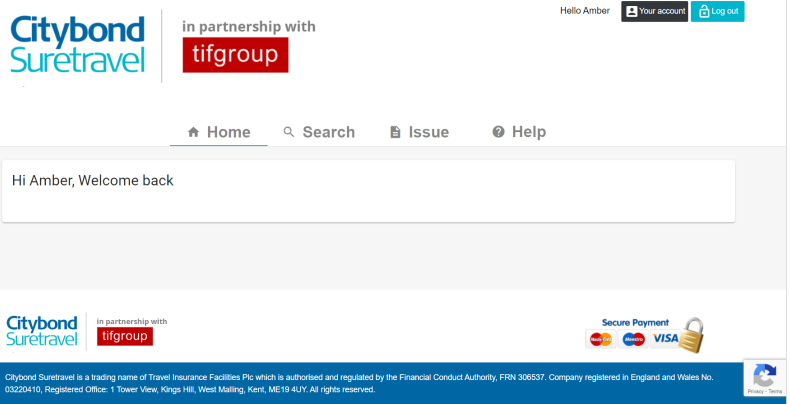
When you first login you’ll see our home screen, you can then navigate to ‘Search’, ‘Issue’ and ‘Help’ by clicking the relevant tabs above ‘Welcome back’.
‘Issue’ Tab
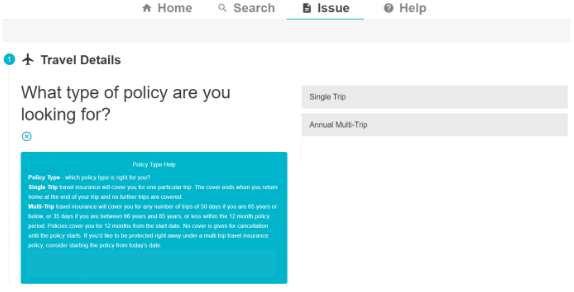
On this screen you’ll be able to issue quotes and policies. We’ve designed this online quote journey to be as user friendly as possible, including lots of information we hope you’ll find helpful.
The journey should guide you through all the relevant steps to complete the quote, and explain the information we need from your client.
If you do need any help, we have created a sales guide, which you can find by clicking the ‘Help’ tab on the portal menu.
Please note, if you’d like to run some test quotes, please use the surname ‘Tiftest’ so we can exclude them from our conversion stats.
‘Search’ Tab
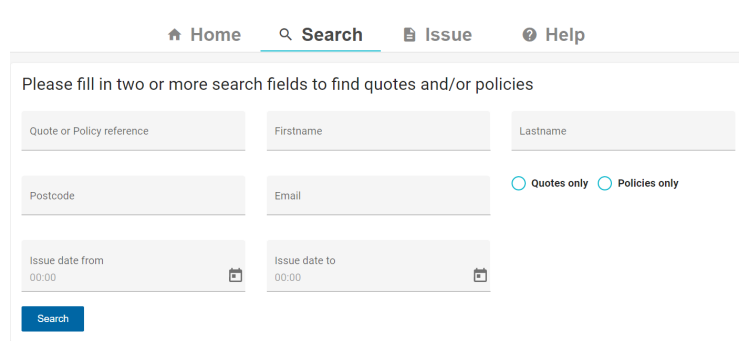
On this screen you’ll be able to search for quotes you have previously saved, or policies you’ve already sold.
You’ll need to add at least two pieces of information to allow the system to return results, for example a postcode and policy reference number, or an email address and last name.
‘Search’ Tab Continued
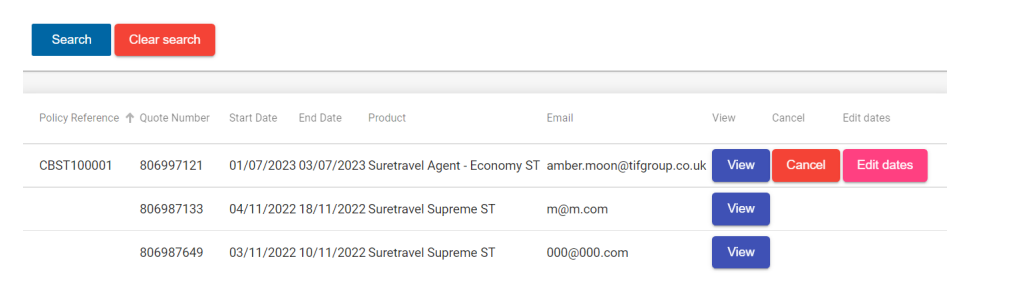
Once the system has found your results, they will appear beneath the search box. If you press ‘view’ you will be able to review the policy or quote details. This will also allow you to edit and sell quotes.
Alternatively, on policies you can also choose to cancel or edit the policy dates by clicking the relevant buttons, as seen below.
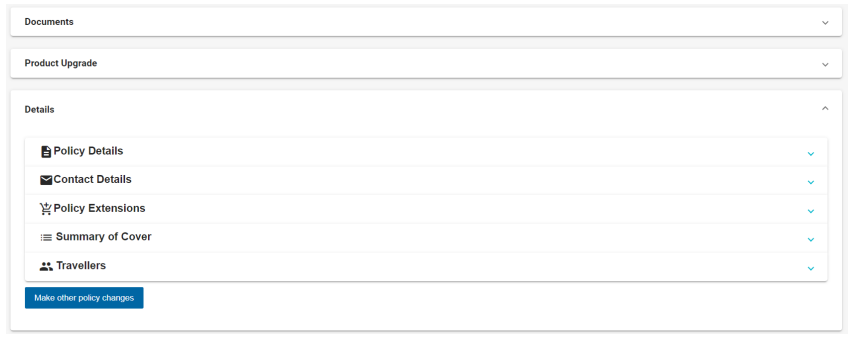
Edit Client Details
If you search for a policy or quote and then click ‘view’, you will be able to edit certain details.
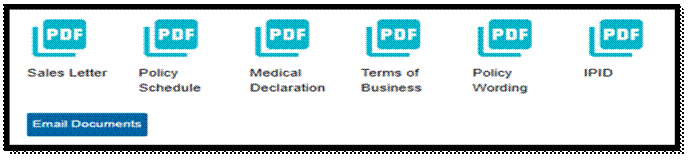
Click the ‘Documents’ section to re-send quote or policy documents
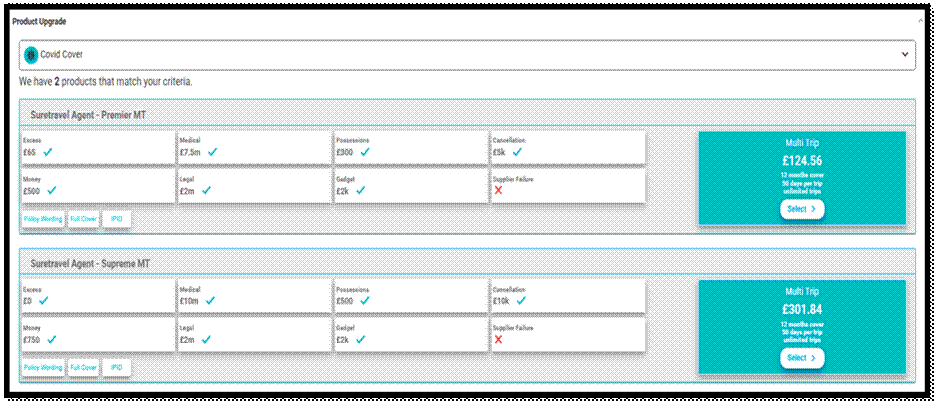
Click the ‘Product Upgrade’ section to increase the customer’s level of cover
Click ‘Travellers’ under the Details section to edit the customer’s name
‘Help’ Tab
When you click the final ‘? Help’ tab in the portal menu, you will be taken straight to our Agent Information page. This page has been specifically designed to provide a sales guide and to answer common FAQS.
Single and Multi-Trip Policy Overview
Single Trip Policies
A single trip policy is designed to cover one holiday. The holiday must begin and end in the United Kingdom. The start date of the policy should be when your client is leaving their home to travel to their departure point and the end date should be when they are planning to return to their home address.
Destinations
We offer cover for the UK, Europe and Worldwide. Please note, we do not cover any countries where the FCDO has advised against travel. A full list can be found here.
Trip Duration and Age Limits
The maximum trip duration your client can purchase varies by age as follows:
Age at the start of the policy Maximum Trip Duration
Up to 75 100 days
76+ 31 Days
Annual Multi-Trip Policies
A multi-trip policy is designed to cover numerous trips within a twelve month period. All holidays must start and end in the United Kingdom, and not exceed the maximum trip duration outlined below. A multi-trip policy can be started up to a month from the date of the quotation, but no cover will be in place until the policy start date. You will receive a policy renewal alert when your client’s policy is due to expire.
Destinations
We offer cover for the UK, Europe and Worldwide. Your client is able to upgrade their cover at any time if they plan to travel outside of their chosen region. Please note, we do not cover any countries where the FCDO has advised against travel. A full list can be found here.
For UK holidays
Your client must have booked and paid for two nights accommodation for UK cover to apply.
Trip Duration and Age Limits
The maximum trip duration varies by age as follows:
Up to 65 years
The maximum trip duration for this age group is 50 days per trip, this can be upgraded to 100 days per trip. This will only be covered if your client pays the appropriate additional premium and it is confirmed in their policy documents.
66 – 70 years
The maximum trip duration for this age group is 35 days per trip, this can be upgraded to 50 days per trip. This will only be covered if your client pays the appropriate additional premium and it is confirmed in their policy documents.
71 – 74 years
The maximum trip duration for this age group is 35 days per trip.
Our Cover at a Glance
It is important to ensure your client selects a suitable cover level for the trip they have booked/are planning. Full cover can be found here: Agent Cover Table – Citybond Suretravel
Economy
Cover Type Cover Limit
Cancellation £1,000
Curtailment £1,000
Medical Emergency £5,000,000
Personal Possessions £750
Policy Excess £95
Premier
Cover Type Cover Limit
Cancellation £5,000
Curtailment £5,000
Medical Emergency £7,500,000
Personal Possessions £2,000
Policy Excess £65
Supreme
Cover Type Cover Limit
Cancellation £10,000
Curtailment £10,000
Medical Emergency £10,000,000
Personal Possessions £3,000
Policy Excess £0
Cruise Travel
Cruise travel is covered as standard on all of our policies and is deemed as a trip involving a sea or river voyage of more than 3 days in total duration, where transportation and accommodation is primarily on an ocean/river going passenger ship.
Please note, for a European Cruise, you will need to select Europe, incl Spain and for a Caribbean Cruise, you will need to select Worldwide excl Mexico. In the unfortunate event of a medical emergency where a client is taken to land for treatment, we need to ensure all nearby countries are covered.
For clients who would like added protection specifically for their cruise holiday – in addition to the cover they are provided by our Economy, Premier and Supreme policies, we offer a ‘Cruise Extension Plus’. This is available at an additional premium during the quote stage or can be added to the policy at a later date (provided your client has not already travelled).
The Cruise Extension Plus offers additional cover for:
- Missed Departure and Missed Connection, including Port Connections
- Cabin Confinement
- Missed Port Visit
- Formal Cruise Attire
Full details for our Cruise Extension Plus can be found here: Cruise Extension Plus
Selecting ‘Cruise’ under Travel Details (as shown below) will automatically add the Cruise Plus Extension to the policy.

Alternatively, you can select the Cruise Plus Extension during the ‘Policy Extension’ section once a policy has been selected. It is important the client has checked the level of cover required by their particular cruise line.
Policy Extensions/Add-Ons
We offer a number of policy extensions to enhance your clients’ cover and tailor it to their specific needs. These can be added to your clients quote under ‘Policy Extension’ once a policy has been selected.
Wintersports Extension
- Provides cover for loss and/or delay of winter sports equipment, loss of ski pass in addition to piste and avalanche closure. Full terms and conditions can be found here: Wintersports Extension
Golf Extension
- Provides cover for lost, stolen or damaged golf equipment taken or purchased on the trip, the cost of necessary hire equipment following misdirection or delay in transit for at least 12 hours, reimbursement for a round of drinks in the event of a Hole in One during any organised competition or tournament. Full terms and conditions can be found here: Golf Extension
Cruise Plus Extension
- Provides cover for missed ports, cabin confinement and unused pre-booked excursions. Cover is also provided for changes to the cruise itinerary. Full terms and conditions can be found here: Cruise Extension Plus
Business Extension
- Provides cover for business equipment, business equipment delays and business money. Full terms and conditions can be found here: Business Extension
Large Scale Events Excluding Covid-19
- Provides cover against events such as acts of terrorism or a natural catastrophe. Cover is extended for cancellation, delays and trip abandonment, missed departure and connections, cutting short the trip and substitute accommodation. Full terms and conditions can be found here: Large Scale Events Extension
Covid-19 Extension
- Our policies include cover for cancellation when your client is unexpectedly forced to cancel because within 14 days of the start of their trip, they, a travelling companion, or the person they are staying with is required by a medical practitioner, a government body or health authority to self-isolate due to COVID-19. This extension provides cover if they need emergency medical treatment while away or if they have to self-isolate during the trip, are quarantined to pre-booked accommodation and it’ll contribute to hotel costs if the client need to quarantine when they arrive home. Full terms and conditions can be found here: Covid-19 Extension
Completing a Medical Declaration
We use a bespoke screening system across our policies. The system was created by our Managing Agency, tifgroup, and is managed inhouse by our Medical Underwriting Team.
When completing a medical declaration you will be asked if your client has a medical condition to declare. Please see below for what would need to be included:
We need to know if you or anyone named on the policy:
- Currently has a medical condition, or
- Has been diagnosed with or treated for a medical condition within the last five years,
or - Takes regular medication, or
- Is waiting for tests, treatment, or a non-routine hospital appointment.
This includes conditions such as heart conditions, asthma, diabetes, cancer (even if in
remission), strokes, high blood pressure, and bowel or digestive conditions
What you don’t need to tell us about:
- Coughs, colds or flu that did not require hospital treatment
- Contraceptive medication or devices
- Routine health checks where no diagnosis was made
- One short course of antibiotics in the last 12 months (as long as you are not taking
them while travelling) - Investigations or treatment relating only to perimenopause or menopause
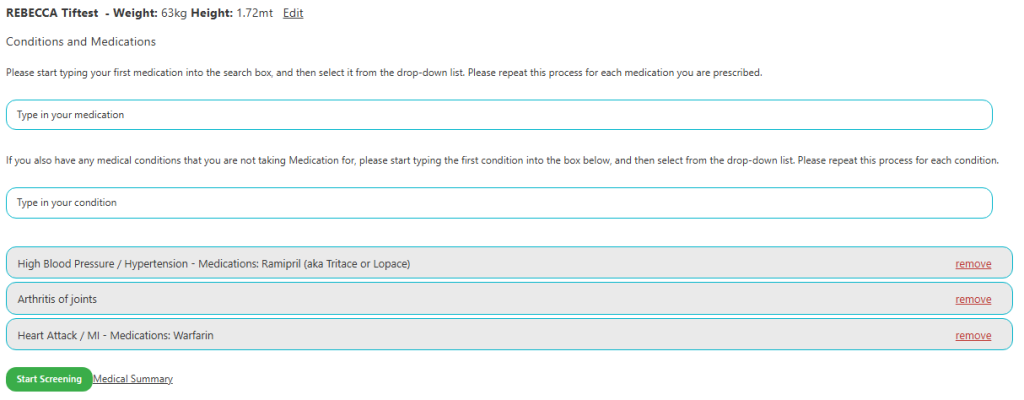
If a medical condition needs to be declared you will be prompted to enter your client’s height and weight as well as any medications they take and the conditions they are prescribed for.
If a condition does not require medication, you can input this separately.
Once everything has been inputted, you can begin screening.
Please note, you will need to screen the condition and not the treatment. For example, if a client tells you they have had a Stent fitted, you would need to screen the reason for the stent i.e. Heart Attack. We are not able to suggest a condition to a client at any stage. If a client is unsure of a medication, condition or an answer they will need to check with their treating doctor or GP.
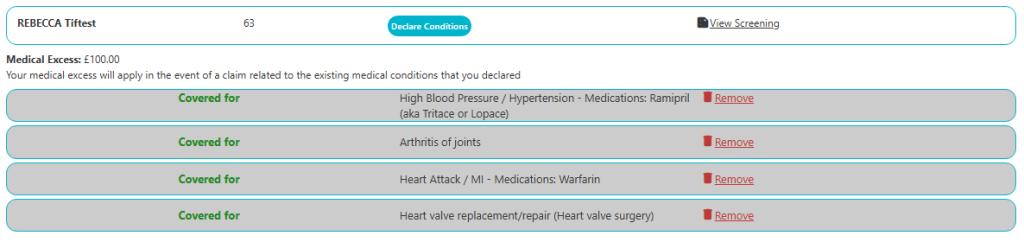
Once you and your client have completed the medical declaration, you will be shown a summary which identifies whether cover can be provided. During the question set for Heart Attack, it asked about surgery, this then prompted the question set regarding the Heart Value Replacement shown under the ‘covered’ conditions.
You will also be shown any medical excess required to be paid in the event of a claim related to the medical conditions that have been declared.
In the example below, there is a £100.00 medical excess and full cover can be provided.
If you would like to discuss the outcome of the medical declaration or double check the conditions have been declared correctly, please use the below process.
This email process applies to:
- Pre-sale medical queries
- Post-sale medical queries
- General medical eligibility enquiries
All medical queries must be submitted using the approved Medical Query Form and sent to: enquiries@protectif.co.uk (The Medical Query Email Template will be emailed to you separately)
Email subject line must follow the format: Reference Number – Customer Surname
A member of the Team will respond within the following service levels:
- Queries received by 1:00pm will receive a response the same working day.
- Queries received after 1:00pm will receive a response no later than 12:00pm the next working day.
Operating Hours
This mailbox is monitored:
- Monday to Friday
- 08:00 – 17:00
- Excluding bank holidays
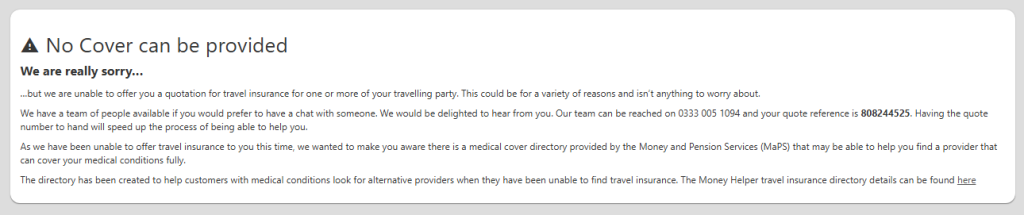
If cover cannot be provided, you will be shown the below notification. Please follow the above process if you would like to double check this outcome with our Medical Underwriting Team.
Amending a Quote
If you would like to amend or purchase your client’s quote, just use the ‘Search’ function on your portal. You will need to input two data sources i.e. Quote Reference and Surname.
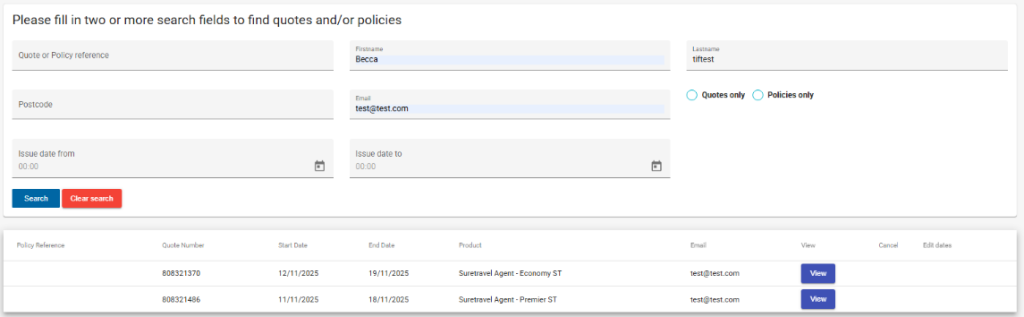
Once you have opened the quotation you will be able to either make the purchase or amend.
The only amendment that cannot be made via the portal is a change to a medical declaration that has already been saved, please use the below process. You can, however, add a new condition if required.
All medical queries must be submitted using the approved Medical Query Form and sent to: enquiries@protectif.co.uk (The Medical Query Email Template will be emailed to you separately)
Email subject line must follow the format: Reference Number – Customer Surname
A member of the Team will respond within the following service levels:
- Queries received by 1:00pm will receive a response the same working day.
- Queries received after 1:00pm will receive a response no later than 12:00pm the next working day.
Operating Hours
This mailbox is monitored:
- Monday to Friday
- 08:00 – 17:00
- Excluding bank holidays
Amending a Policy
If you would like to view your client’s documents, resend them or check the policy details, just use the ‘Search’ function on your portal. You will need to input two data sources i.e. Policy Reference and Surname. Once you have selected the correct policy you will see the below:
Policy Documents
Policy Details
You can upgrade to a higher level of cover under the ‘Policy Upgrade’ section. Please note, you cannot downgrade a policy.
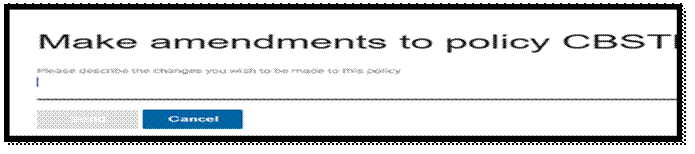
To make changes to the policy, please select ‘Make a Policy Change’. The below pop up will appear and you will be prompted to describe the change you wish to make. This will then be sent to our Account Management Team who will either make the change and resend client documents, refer the request to a member of our client service team to complete or call you to discuss the change further.
Compliance
Key Regulatory Requirements
FCA Regulations and Consumer Duty (PRIN 2A): You are expected to act in the best interest of the customer by ensuring transparency in all communications and preventing foreseeable harm.
You must adhere to FCA’s Consumer Duty: Ensuring that all referrals are handled fairly and that the customer understands their options clearly.
What You Can and Can’t Do: You may refer customers to our platform and share marketing material. However, you must not provide advice in selling or distributing insurance products.
Financial Promotions Sign-Off Overview
As an agent of the insurer, tifgroup is responsible for ensuring that any financial promotions created or distributed by Sub-Agents or Affiliates are fully compliant with FCA rules.
FCA Definition of Financial Promotion:
A financial promotion is any communication that encourages participation in a financial product or service (including insurance). This can include:
- Advertisements
- Emails
- Social media posts
- Website banners
FCA Rule: Financial promotions must be clear, fair, and not misleading.
tifgroup’s Role and Responsibilities
tifgroup must:
- Approve all financial promotions before they are published or shared.
- Ensure that the content is accurate, clear, and balanced.
- Comply with FCA rules, including Consumer Duty (PRIN 2A), ensuring no misleading claims.
Key FCA Rules for Financial Promotions
- Clear, Fair, and Not Misleading: Financial promotions must be truthful, easily understood, and should not exaggerate benefits or hide risks.
- Consumer Duty: All promotions must aim to achieve good outcomes for consumers.
Approval Requirement
Before any promotional material is used, tifgroup must sign off on it, ensuring it aligns with FCA standards. This includes reviewing content for clarity, fairness, and compliance with PRIN 2A and other relevant rules.
Example of FCA Compliance
- Misleading Claims: A promotion stating “best coverage at the lowest price” without evidence would violate FCA rules. tifgroup will not approve such a promotion until it is revised to be truthful and clear.
Final Sign-Off
- All financial promotions must be approved by tifgroup’s Compliance team before they are shared with customers.
- This ensures compliance with FCA’s clear, fair, and not misleading standards.
Ongoing Monitoring and Compliance
Regular Compliance Reviews: We will review your activities every six months to ensure that your marketing materials and customer referrals remain compliant with our Terms of Business Agreement and FCA guidelines.
Corrective Actions: If any compliance issues arise, we will work with you to address them. Failure to resolve any non-compliance issues may result in the suspension of your referral privileges or termination of the agreement.
Support and Communication
If you have any questions or need support, your Account Management Team is available via:
Telephone: 01233 564150
Email: citybondpartnerships@tifgroup.co.uk
Working Hours:
- Monday to Friday
- 09:00 – 17:00
- Excluding Bank Holidays
For Medical Declaration Queries and Support, please contact our team via:
Email: enquiries@protectif.co.uk
A member of the Team will respond within the following service levels:
- Queries received by 1:00pm will receive a response the same working day.
- Queries received after 1:00pm will receive a response no later than 12:00pm the next working day.
This mailbox is monitored:
- Monday to Friday
- 08:00 – 17:00
- Excluding Bank Holidays
Alternatively, our Compliance Manager, Katy, will assist where possible via:
Email: compliance@tifgroup.co.uk
We will send regular updates to ensure you’re always informed about product changes, regulatory updates, and any other important information that may affect your role.